Poco phones, especially the X series, have always meant something to us gamers: lots of power, little money. These were true flagship killers that let us play games that were only available on phones two or three times more expensive, on a reasonable budget.
We want to see how the next generation of this popular series, the Poco X7 Pro, performs in games. The winning card of this phone is not only its new design; Poco has two free shots in its magazine: the first is a gigantic 6,000 mAh battery with a 90-watt charger and the second, MediaTek’s new beating heart, the Dimensity 8400 Ultra chipset.
Poco claims that this phone is a gaming monster. But at Wise Selecting, we don’t care about claims and advertising. We’re here to put this phone through the most brutal gaming tests, sweat it out, and see if it can really challenge the flagships, or if it’s just strong on paper. We’re going to test popular games together to see how many kills it can handle. So stay tuned for our Poco X7 Pro gaming review!
Xiaomi Poco X7 Pro specs
First, let’s quickly skip the non-gaming stuff (you can check out our Poco X7 Pro review for more details). The design of the phone is sleek and modern. It has a massive 6.67-inch 1.5K AMOLED display that gives you a 120Hz refresh rate. This display is a real godsend for gaming; it’s both high-resolution and incredibly bright. The screen brightness is also excellent and doesn’t fade in direct sunlight. For protection, Poco has used Corning Gorilla Glass 7i and there are stereo speakers in place, which are great for detecting footsteps in shooter games.
Now let’s get to what makes this phone a gaming phone.
- CPU: As we said, the beating heart of this phone is the MediaTek Dimensity 8400 Ultra chipset. This is a 4nm chipset, which means it is both very powerful and energy-efficient. Its octa-core processor includes powerful Cortex-A725 cores that are ready for heavy processing.
- Graphics (GPU): The part that is directly related to the frame rate of your game is the Mali-G720 MC7 graphics processor. This GPU should be able to render modern games with high graphics and smooth frame rates.
- RAM and storage: Here Poco has made a professional move and used UFS 4.0 internal storage. What does this mean? This means that the loading speed of games, maps and levels is extremely high. No more napping on the game loading screen!
- Cooling system: High power also generates a lot of heat. Poco claims to have used Liquid Cool 4.0 cooling technology along with a large vapor chamber. We have to see if this system can prevent this MediaTek monster from overheating and preventing frame drops.
- Battery and charger: And Poco’s trump card. A gigantic 6000 mAh battery! This battery is not attractive on its own; it is necessary to provide high power consumption of the 1.5K display and the powerful Dimensity 8400 Ultra chipset. Along with this battery, a 90W adapter is also included in the box. This means you can play for hours and then fully charge the phone in less than 45 minutes and get back to playing. This combination officially eliminates the stress of running out of battery in the middle of a game.
Poco X7 Pro Gaming Test
Well, the theory part is over, let’s get to the action. Our testing method is as follows: We selected 5 of the heaviest and most popular games. In each game, we first turn the graphics settings all the way up. Then we play for 20 minutes and see how many frames (FPS) it gives, how much temperature it gets, and how much battery it burns. Then we tell you the best settings for smooth gameplay.
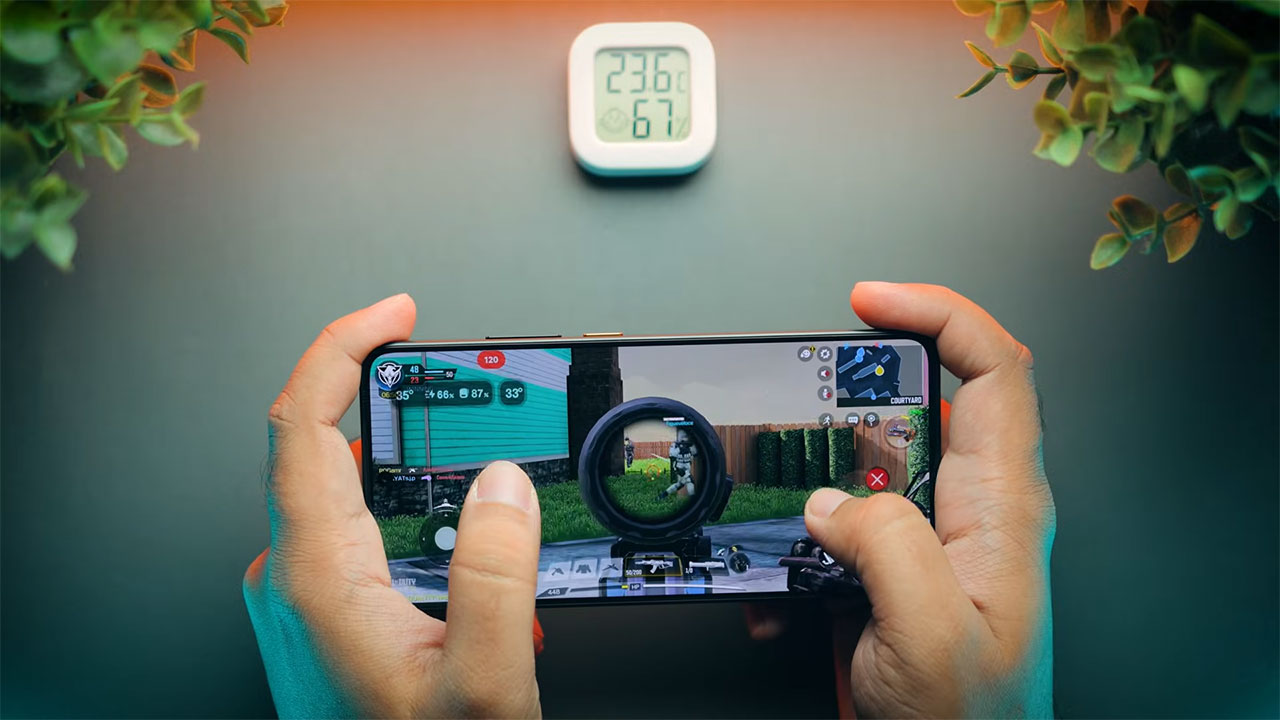
Poco X7 Pro Call of Duty Mobile Game Test
Ultimate settings: First, we went to Call of Duty Mobile. When you set the graphics to Max, the game automatically locks the frame rate to 60. In this case, the phone doesn’t say ah. The frame rate is completely locked at 60. No lag, no frame drops, not the slightest stroke. It’s like he’s opening the phone’s gallery!
- Recommended settings (120 frames): But we are gamers and we want 120 frames! To do this, just set the graphics to Medium and the frame rate to Ultra. In this mode, you can easily get a stable frame rate of 120 in the multiplayer section, and in Battle Royale, the frame rate is around 90 to 100 frames, which is incredibly smooth.
- Temperature and battery (20-minute test): After 20 minutes of playing on 120 frame settings, the phone’s temperature is very good and acceptable, reaching about 37.6 degrees Celsius. This means that the phone only gets warm, not hot. The Liquid Cool 4.0 cooling system does its job very well. Battery consumption was also about 6 to 8 percent in these 20 minutes.
One thing, some users on Reddit reported that at 120 frames, they felt a slight delay in response or latency in the touch. This is not a common problem and is probably a software bug that will be resolved with future HyperOS updates or the game itself, but overall the phone’s performance in gaming is considered perfect. Overall, this phone is a gamer’s food. Whether you want 60 frames with max graphics or a smooth 120 frames for multiplayer, the Poco X7 Pro does not disappoint.(Xiaomi Poco X6 Pro long-term review)
Genshin Impact Game Test on the Poco X7 Pro
- Ultimate Settings: Now it’s time to take the phone to hell! We move on to the heaviest mobile game, Genshin Impact. We turn the settings all the way up and lock the frame rate at 60.
- Performance and Frame Rate: This is where the phone starts to sweat. For the first 15-20 minutes, the Poco X7 Pro delivers a solid 60fps like a true flagship. We were really impressed. But…
Frame drops and temperatures: This game pushes the phone to its limits. After about 20 minutes of heavy gameplay and scrolling through busy maps, the temperature reaches 41.4 degrees, and in some places even 44-45 degrees. This is where the cooling system stops working and the phone gradually and gently lowers the frame rate to 45fps to maintain stability and prevent damage.
- Important note: This frame drop to 45fps is not a bad thing at all! Many more expensive flagship phones also lag in Genshin. The important thing is that this drop is not sudden and laggy, but gradual. This means that your gameplay is not ruined, it just becomes a little less smooth. 45 FPS in Genshin with Max graphics is an achievement in itself!
- Temperature and battery (20 minute test): After 20 minutes of playing on Max, the temperature reached 41.4 degrees and consumed about 7-9% of the battery.
This phone runs Genshin very well. If you want to get 60 FPS all the time, set the graphics to Medium. But it is also completely playable on Max and only in long games (over 20 minutes) does the frame rate drop to 45.
PUBG Mobile game test on Xiaomi X7 Pro
- Ultimate settings: In PUBG, when you set the settings to Max (for example, HDR or Ultra HD), the frame rate is locked at 60. Like Kalaf, the phone runs these settings like water. Completely smooth and stable.
- 120 Frame Challenge: But we want to get 120 FPS. So we set the graphics to Smooth. The 120 FPS option is also available. But here’s where the weird story begins.
- Performance and frame rate: Unlike Call of Duty, PUBG’s 120 FPS is not stable on this phone. As soon as the fight gets busy or there are a few enemies around you, the frame rate starts to dance. It goes to 100, then 90, and even drops to 87 FPS in heavy fights. In some tests, it even dropped to 60 FPS!
- What’s the problem? This is not a problem with the phone’s power. The Poco X7 Pro can easily render 120 FPS. This is exactly the problem with PUBG’s optimization for the new Dimensity 8400 Ultra chipset. PUBG has not yet been able to properly match this new processor.
- Recommended settings: If you want a stable and lag-free experience and don’t get frustrated, skip 120 frames for now and play at 90 frames (Smooth). In this mode, the phone will give you a stable 90 frames, which is much better than an unstable 120 frames.
- Temperature and battery (20-minute test): PUBG is not a heavy game at all. After 20 minutes of play (on the max 60 frames setting), the temperature was around 36.5 degrees and it only reduced the battery by 5-6%. Of course, if you play at 120 frames, the temperature will reach 45 degrees after 30 minutes.
This phone is great for PUBG, as long as you manage your expectations. If you are looking for a stable 120 frames, this phone can’t give you that right now. But for a stable 90 frames or a max 60 frames, it works great.
Asphalt Legends Game Test with Poco X7 Pro
- Ultimate Settings: We went for the love of car gamers. We put Asphalt 9 (or Legends) on High Quality and turned everything up to the max.
- Performance and Frame Rate: This game was like a joke for Poco X7 Pro! The frame rate easily runs above 60 to 70 frames and gives you an incredibly smooth and cinematic experience. No lag, no frame drops, nothing.
Temperature and Battery (20-minute test): The interesting thing is: this phone doesn’t get hot at all when running Asphalt 9! After 20 minutes of cornering on the streets, the phone’s temperature was only 35.3 degrees. This means the coolest performance among all the heavy games we tested. Battery consumption was also very low at around 4 to 5 percent.
If you love car games, this phone is made for you. Cool, smooth and low power consumption.
Fortnite game test with Poco X7 Pro phone
- Ultimate settings: Fortnite is a completely different story from the Android world and is a game that is extremely poorly optimized.
- Performance and frame rate: You can set the settings to Low and open the frame rate up to 120 frames. But will you get 120 frames? Oh my! The frame rate goes up and down a lot. At best, it might give about 90 frames, but as soon as there is a fight or the camera rotates quickly, it has bad frame drops and ruins the game experience.
- Where is the problem? I emphasize again, this is not a problem with Poco X7 Pro, this is a problem with Fortnite on the Android platform. This game is challenging even on the most powerful Snapdragon flagships, let alone MediaTek, which has not yet been optimized for it.
- Temperature and battery (20-minute test): Fortnite eats up the battery! 20 minutes of playing at 60 frames will drain 10% of the battery. If you want to play at 120 frames, this consumption will be much higher. The temperature will easily reach 40-42 degrees.
This phone is not good for Fortnite. You can run it and play, but you will not have a smooth experience and your battery will be destroyed. It is not your phone’s fault, it is Epic Games’ fault.
Light game testing with the Poco X7 Pro phone
Well, when a phone runs Genshin Impact at 60 frames, testing games like Subway Surfers or Candy Crush on it is kind of an insult to that processor! It turns out that it runs these games like peach and at a full 120 frame rate.
But there is one important point! Many (even on previous Poco phones) have reported that light games like Subway Surfers, which support 120 frames per second, are locked at 60 frames per second on their phones and don’t get the true 120 frames per second.
This is a software bug in HyperOS (or MIUI). Poco’s operating system limits the frame rate to save battery. If you’re having this issue, here’s what to do:
- Go to Settings, then Apps.
- Look for the “Battery and performance” app.
- Tap and select Clear all data.
This usually frees up your games’ frame rate and you can enjoy the true 120Hz.

How does the Poco X7 Pro perform in games?
Well, our tests are over and it’s time to sum it up. The Poco X7 Pro is an incredibly powerful phone. The Dimensity 8400 Ultra chipset is a real beast that can handle any heavy game.
Poco X7 Pro’s strengths in gaming
- Terrible processing power: It performed excellently or very well in all games (except those that had optimization problems).
- Great display: That 120Hz 1.5K AMOLED panel is officially made for gaming.
3N Battery and charger: The combination of a 6000mAh battery and a 90W charger means battery stress, never! You can play heavy games for 3-4 hours at a time and then fully charge it in less than 45 minutes.
4F Cooling system: The Liquid Cool 4.0 system does its job well. It prevents overheating and more importantly, it makes frame drops gradual (like Genshin) rather than sudden.
Weaknesses of Poco X7 Pro in games
- Problem with optimizing 120 frames: This is the biggest weakness. This phone has the power of 120 frames, but games like PUBG and Fortnite are not yet optimized for this MediaTek chipset. You are buying a Ferrari that has a speed limit of 90 on some roads!
- A little overheating in Genshin: In very heavy games like Genshin, the phone heats up after 20 minutes and has frame drops. (Of course, this is normal for such a heavy game).
Finally, the Poco X7 Pro, priced at around 35-36 million tomans, is one of the best gaming phones on the market. This phone is a complete package: power, display, and battery. This phone is also an investment for the future. As soon as game developers update and adapt to the Dimensity 8400 Ultra chip, that 120 FPS PUBG problem will be solved and this phone will officially become unbeatable.