
Samsung (January 2025) unveiled the Galaxy S25 Ultra. Everyone was talking about the Snapdragon 8 Elite, the titanium design that was supposed to shake the world, and the artificial intelligence that they said would take our place. But, well, everything is always a blur at first. Now that we are approaching the end of 2025 and about 10 months have passed since the launch of this phone, that initial excitement has subsided and the dust has settled. At Wise Selecting, we are not used to just being satisfied with numbers on paper and laboratory benchmarks taken under ideal conditions. We want to see how the phone behaves when you leave it in your pocket for 10 months, play with it in the heat of summer and the cold of winter, take thousands of photos in harsh lighting conditions, and install various updates (from One UI 7 to One UI 8). Is the battery as good as the first day or do we have to run for a charger now? Has the camera improved with updates or has Samsung, as usual, screwed up with new updates?
In this long-term review of the S25 Ultra, I want to dissect this phone for you. From the glaring bugs that no one told you about on the first day to the features that you will only love after a few months. This is you and this is the long-term review of the Samsung S25 Ultra!
Long-term review of the design of the Samsung S25 Ultra
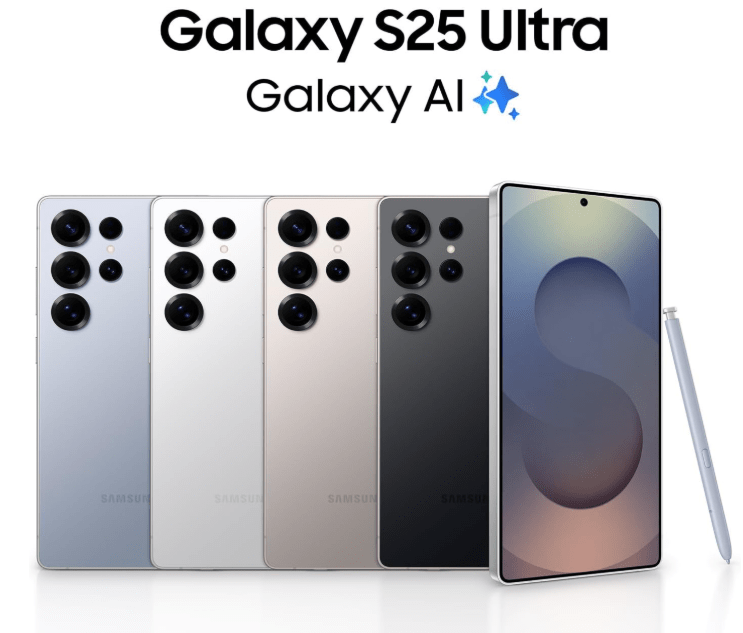
The first thing you notice after 10 months of using the S25 Ultra is that Samsung is finally reaching a maturity in design that may not be exciting and revolutionary, but mature and dignified. The flat and angular design of this phone, reminiscent of the old Note series, is still maintained but with minor changes. The titanium frame of the device has shown during this time that it is not just a promotional word and has good resistance to everyday scratches and scuffs. The Gorilla Glass Victus 2 Armor 2, which covers both the back and front of the phone, has shown very few scratches and scuffs after 10 months of use without a screen protector, which shows that Samsung has not skimped on the material department.
However, one thing that many users have pointed out in these 10 months and we also felt it wholeheartedly in our reviews is the phone’s comfort. You see, Samsung has done its best to distribute the weight of the phone better and to be honest, it feels lighter than a brick like the S23 Ultra, but those sharp corners, oh those sharp corners! This rectangular design may be very stylish and businesslike, but in long-term use, it will tear your palm. If you are used to holding the phone with your little finger, like me, after half an hour of scrolling on Instagram or Twitter, you will see a deep and painful mark on your finger as if you cut it with a knife. In these 10 months, there have been many times when I had to put the phone down in the middle of a game or chat and give my hand a rest.
The location of the volume and power buttons is very good and they are easy to access. But the ultrasonic fingerprint sensor under the display is fast, its security is high, but still after all these years, its position is a bit low for some. But one thing that is still a question after all this time is why Samsung still doesn’t include a 3D facial recognition system (like the iPhone’s Face ID)? In these 10 months, especially when your hand is wet or in complete darkness, you miss proper and reliable facial recognition. Samsung has 2D facial recognition, but its security is low and it is completely disabled in the dark.(Samsung v vs. Samsung S24 FE Comparison)
Goodbye to Bluetooth S Pen: Regression or logical decision?
One of the strange changes and perhaps regressions that occurred in the internal design of the S25 Ultra and was more noticeable in the long run was the removal of Bluetooth capabilities of the S Pen. Samsung came along and said we want to make the phone thinner or maybe we want to cut costs, and pulled the battery and wireless charging coil out of the pen.
What was the result? No more Harry Potter gestures (Air Actions). You might say on the first day, go ahead, Dad, who was going to wave the pen in the air to turn the music up and down? And I agree with you, that part was very lame. But, and a big but, the fact is that the remote camera shutter feature was something that many professional users and content creators depended on.
In these 10 months, there have been many times when we wanted to take a group photo and I planted the phone in a corner, but I remembered, oh my god! I can’t take a photo by pressing the button on the pen anymore and I have to set the timer and run into the frame. Or for those of us who produce content, recording unboxing videos without having to reach for the phone to pause and resume recording was much easier with previous styluses. This shows that change is not always for the user’s benefit, and sometimes Samsung’s innovation means removing features we thought were standard. The stylus is still great for writing and drawing, and its latency is close to zero, but the feel of a smart tool has changed to that of a regular stylus with only the tip working.
Samsung S25 Ultra Long-Term Display Review
If I were to name just one feature that still amazes me every time I pick up the phone after 10 months and makes me not want to go to any other phone, it would be the anti-reflective coating on the screen. This technology, which started with the S24 Ultra and reached full maturity in the S25 Ultra, practically kills the reflection of ambient light.
In long-term use, this feature worked wonders. When you’re in direct sunlight, or even in a room full of lamps and moonlight, instead of seeing your face on the screen (and realizing how tired you are!), you see the content on the screen with excellent contrast and deep blacks. This feature also has a very important side effect; because the reflection is low, you don’t need to turn the screen brightness all the way up (2600 nits) to see the content. This makes the screen’s battery consumption noticeably lower. I really like Samsung for this move! (The coolest, coolest, sexiest gaming phone in America)
The 3120 x 1440 resolution on this 6.9-inch panel means a fantastic pixel density. After 10 months of binge-watching YouTube, Netflix, editing photos, and scrolling through social media, I have to say that the color quality and sharpness are still unmatched. Colors are saturated and vibrant in Vivid mode, and as accurate as you can get in Natural mode. You see, OLED panels always have that burn-in fear in their hearts. Especially now that Samsung’s Always On Display feature also shows the wallpaper and is very bright. On Reddit forums and user reports, some people were worried about this issue. But fortunately, in our tests and most users’ reports after nearly a year, there has been no widespread burn-in problem. It seems that Samsung has largely tamed this scary giant with software techniques (such as subtly moving pixels or Pixel Shift) and the high quality of the organic material of its new panels. Of course, there are still isolated reports of keyboard or status bar shadows in users who always keep the brightness at 100% and stay on a fixed screen for hours (like the Waze navigation), but it is not common and if you have normal use, you can rest assured.
A small negative point that is less discussed in the initial reviews but shows itself in long-term use, is the issue of the PWM (pulse width modulation) rate. Although the screen is 120 Hz and animations run smoothly, its dimming frequency is only 480 Hz.
So what does this mean? That is, when you dim the screen (for example, in bed at night), the screen turns off and on at a speed of 480 times per second to reduce the light. This number is very low compared to Chinese competitors like OnePlus or Honor, which reach spatial numbers of 3840 Hz. If you have sensitive eyes, you may notice eye fatigue, dry eyes, or even mild headaches after a few months.
Another odd issue that comes up a lot in long-term reviews is the minimum screen brightness. When you turn on the phone in total darkness (say, 3 a.m.), even with the brightness slider turned all the way down, the screen is still quite bright and blinding. Users have to use the Extra Dim software feature, which is an extra step and one doesn’t always remember to enable it. I don’t know why Samsung can’t adjust the light calibration so that it gets really dark in the dark.
The first thing you notice after 10 months of using the S25 Ultra is that Samsung is finally reaching a maturity in design…
However, one thing that many users have pointed out in these 10 months and we also felt it wholeheartedly in our reviews is the phone’s comfort…
Goodbye to Bluetooth S Pen: Regression or logical decision?
One of the strange changes and perhaps regressions that occurred in the internal design of the S25 Ultra…
Long-term battery performance of the Samsung S25 Ultra
The 5,000mAh battery of the S25 Ultra easily lasts a full day with normal to heavy use. Most users reported that with mixed usage (Wi-Fi, mobile data, some gaming, YouTube, and social media), they still had about 20 to 25 percent charge at the end of the night, which is a very good number. This shows that the Snapdragon 8 Elite processor has good power consumption optimization.
The positive point is that after 10 months of continuous use and daily charging and discharging, there has been no noticeable battery degradation. This means that the charging and cooling systems are doing their job well and the battery has not been damaged under heat stress.
The charging speed is something Samsung should really be ashamed of! It’s 2025! Mid-range Chinese phones are coming with 100 and 120 watt chargers that fully charge the phone in 20 minutes. At that time, Samsung was still locked to 45 watt charging for its $1,300 flagship.
It takes about 1 hour and 10 minutes to fully charge this phone (from 0 to 100). You might say, “Well, I’ll charge it all night long,” but when you’re in a hurry and want to charge your phone for several hours of use in 10 minutes, this slow speed is really annoying.
Samsung S25 Ultra Long-Term Camera Review
On paper, the S25 Ultra’s camera isn’t revolutionary compared to its predecessor. Same 200MP main sensor and zoom lens combo. But what about in practice? Photos taken with the main camera in daylight are still excellent and flawless. Details are plentiful and colors (now a bit more natural and less saturated than before) are pleasing to the eye. Dynamic range is excellent, and shadows and highlights are well-managed. 10x and even 30x zoom are still unrivaled in the mobile world, and the iPhone 16 Pro Max, with its 5x zoom, falls short of this phone at long distances. If you’re into shooting distant subjects, birds, or architecture, the S25 Ultra is still your best friend.
At night, it’s a different story. Samsung has been touting Nightography a lot, but in reality, it still has its problems.
- Sky noise: In night photos, sometimes the sky is noisy instead of solid black.
- Over-processing: The camera software tries to restore details by sharpening the edges, which makes the photos look artificial and painterly.
- Unnatural lighting: Sometimes the photos are so bright that the feeling of night is completely lost and it feels like noon!
- Flare problem: The handling of strong light sources (such as street lights) is still not as good as the iPhone or Chinese flagship phones (such as the Xiaomi 15 Ultra or Vivo X200), and sometimes the reflection of light in the lens (Lens Flare) ruins the photo.
Selfies are good, but not great. In portrait mode, edge detection (especially messy hair) is very good and the bokeh effect (background blur) is more natural. But skin tones are not very attractive. Samsung still tends to either overexpose skin tones or give them a yellow/gray cast, which makes faces look a bit lifeless and sickly. In this department, the iPhone and Pixel still capture more natural skin tones and their photos are more attractive to share on social media.
Samsung claims that the S25 Ultra has the best video recording experience. At 8K resolution, the videos are really sharp and detailed, but the file sizes are terrible and practically useless. At 4K 60fps, which is the gold standard, the quality is very good, the optical image stabilization (OIS) works better and you can capture very clear videos.
However, in a direct comparison with the iPhone 16 Pro Max, the Samsung videos are still a step down. Why?
- Switching between lenses (for example, from main to ultra-wide) is very smooth and imperceptible on the iPhone, but you feel a small jump on the Samsung.
- A strange and very annoying bug that has been reported in the last 10 months and is still not fully fixed is the momentary audio cut-off when switching between the front and rear cameras while recording a video. Imagine you’re vlogging, you turn the camera on yourself and suddenly your audio cuts out for a second. This is unacceptable for a $1,300 phone.
Output resolution issue (12MP vs 24MP)
A technical criticism that professional users have of the S25 Ultra is the default 12MP output for photos. Apple has switched to 24MP as the default output on the new iPhones, which has much more detail without increasing the file size. Samsung is still stuck with 12MP. You can go to 50 or 200MP, but you lose a lot of processing features (like HDR and hybrid zoom). This is a missed opportunity for Samsung.
Samsung S25 Ultra Long-Term Performance Review
The beating heart of this phone is the Snapdragon 8 Elite chip (Snapdragon 8 Elite for Galaxy), which Qualcomm has overclocked a bit in collaboration with Samsung. In early benchmarks, this chip broke records and everyone was speechless. But how is it after 10 months?
In everyday use, this phone officially flies. There is no lag, no slowdown, and no pause in opening apps. The animations of One UI 8, which are now much smoother, combine with the power of this processor and create an unparalleled user experience. Multitasking, opening 3 apps at the same time (Split screen), editing heavy 4K videos in Inshot or LumaFusion, and rendering, all run smoothly. You don’t feel like the phone is under pressure at all.
Gaming and Thermal Throttling: The Sad Story of Gamers
This is where the story gets a bit complicated and dramatic. In the first months and with lighter games, everything was fine. But as time passed and games like Genshin Impact, Call of Duty Warzone and Honkai Star Rail, which have console graphics, were updated, some harsh truths were revealed.
In our heavy tests on Genshin Impact with the highest graphics settings (Max Settings + 60 FPS), the phone performs great for the first 20-30 minutes and keeps 60 frames per second. But after that, the temperature rises sharply. Although Samsung said that it has increased the Vapor Chamber cooling system, it still doesn’t seem to be able to handle the heat generated by this dragon.
After about half an hour of continuous gaming, the phone starts to lower the processor frequency and also reduces the screen brightness to protect the internal components. This is where the frame rate fluctuates from 60 to 45 or 50. The body of the phone, especially around the camera, gets extremely hot (sometimes up to 45-46 degrees), which makes it difficult to hold the phone without a frame.
An interesting and strange thing that was discovered on Reddit by professional users and caused a lot of noise, is that Samsung has implemented a kind of power budget throttling. The story is that the operating system is programmed in such a way that even if the phone has not yet reached a critical point in terms of temperature, if the processor’s power consumption exceeds a certain level (for example, 12 watts), the system artificially limits performance so that the battery does not run out quickly.
What does this mean? You bought a Ferrari whose engine can go 300, but the factory has set a limit so that it does not go more than 200 so that it does not run out of gas quickly! This is a big deal for professional gamers and those looking for the ultimate in performance, and has caused the phone’s stability to sometimes drop below 60% in stress tests like 3DMark, which is not at all interesting for a gaming phone.
For tech nerds who like to run PC or old console games on their phone (like the Winlator or Yuzu emulator), the S25 Ultra is a monster and runs most games. But the same thermal and power consumption limitations hold you back here too. Running heavy PS2 or Switch games may slow down after a while, which shows that even the most powerful chip in the world cannot bypass the limitations of physics in a slim mobile body.
Long-term review of the Samsung S25 Ultra user interface
Samsung has promised 7 years of updates, and so far, in the past 10 months, its performance in providing security patches and bug fixes has been excellent. During this time, we saw the transition from One UI 7 to One UI 8 (based on Android 16), which was a major generational change.
One UI 8 has a lot of visual changes that may seem strange to you at first. The Quick Panel has been completely redesigned and resembles the Control Center of the iPhone and Xiaomi (separating notifications from settings by swiping left and right). But the positive point is the crazy customization capabilities. Now you can change the position of the buttons, change their size and even make the volume and brightness sliders vertical or horizontal. This level of freedom is something that iOS users can only dream of.
Remember how much they maneuvered with the AI on the first day? After 10 months, let’s judge for ourselves: which of these features really came in handy and which were just advertising?
And Circle to Search: This feature is amazing. We still use it several times a day. Seeing a shoe on an actor’s foot and finding its model, or translating a text in a photo by drawing a circle around it, is extremely useful and addictive.
- Text and Voice Summarization: Great for students and journalists. Recording an hour-long meeting and receiving its summarized text is a lifesaver. Its accuracy has also improved a lot in the last 10 months with updates.
- Live Call Translation: The idea is brilliant, but the execution still needs work. It feels robotic and is often inaccurate, especially for Persian, whose support is not yet complete and perfect, and sometimes it mixes up sentences.
- Generative Edit: It’s fun, but it’s more good for fun and Instagram stories than serious work. Removing extra people from a photo works well, but when you want to add something, the output still has a cartoonish and artificial look.
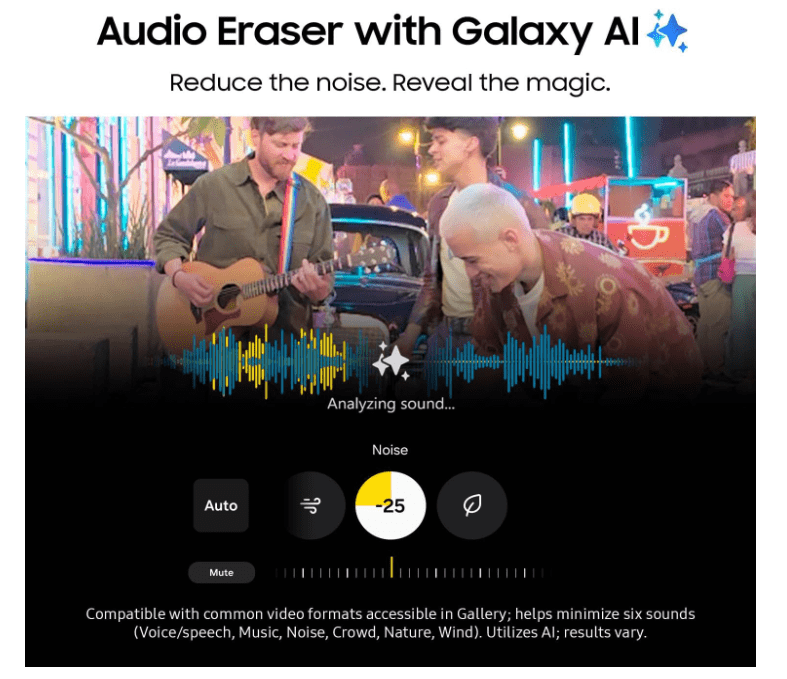
- Audio Eraser: This is one of those features that has received less attention but is very annoying. You can use AI to remove background noise (such as wind or car noise) in your videos to make your voice clearer. This is a godsend for vloggers.
A software issue that has not been fixed after 10 months and several updates is the annoying lag in the Samsung phone keyboard when typing in some apps like Telegram and ChatGPT. It feels like the keyboard is lagging behind your typing speed. Also, the appearance of the icons and the user interface has become a bit old and repetitive for some people and does not have the fresh feel of Chinese user interfaces like HyperOS.
Long-term performance of the Samsung S25 Ultra speaker
This is the part that has disappointed many users, including myself. When you move from the S23 Ultra or even the S24 Ultra to this phone, you expect the sound to be better, but to your surprise, the sound feels flat, lifeless, and hollow.
Many users on Reddit and Samsung forums complain that the S25 Ultra speakers have poor bass and lack the punch and depth of previous generations. At high volumes (above 80%), the sound becomes sharp and annoying (high treble) and the sound separation is broken.
Why is this? It seems that Samsung has made the sound cavity smaller to accommodate other components (like a larger battery or a new cooling system). In the world of audio, space equals bass. When space is reduced, the sound becomes shallow and flat.
What is the solution? Samsung has tried to improve the situation with software updates and Dolby Atmos, but you can’t fool physics. The only thing you can do is go to the equalizer (EQ) settings and manually boost the bass and reduce the high frequencies. However, if you are a music lover or like to watch movies on your phone, be sure to count on a good pair of headphones, because the speaker itself is not at the level of a flagship and has nothing to say in front of the iPhone 16 Pro Max.
Is the S25 Ultra still worth buying?
Well, friends, after 10 months of living with the Samsung Galaxy S25 Ultra, we have reached the last stop. Let’s be honest; this phone is still the most complete package in the Android world, but it no longer has that old magic. Samsung has slept a bit on the wind of its previous successes and its changes have become very cautious.
Final list of pros and cons of the S25 Ultra
Why should we love it? (S25 Ultra Strengths)
- Display: The world’s best display with an anti-reflective coating that’s easy on the eyes.
- Software: 7-year software support and One UI 8’s unparalleled personalization features.
- S Pen: Despite the removal of Bluetooth, it still has no competitors for taking notes, drawing, and signing digital documents.
- Zoom camera: If zoom is important to you, no other phone can beat it.
- Durability: Titanium body and strong glass that still looks like the first day after 10 months.
Why should we complain about it? (S25 Ultra Weaknesses)
- Speaker: Flat and weak sound compared to the previous generation and competitors.
- Charger: 45-watt charging speed, which is really slow for 2025.
- Ergonomics: Sharp corners that hurt the hand.
- Heavy gaming: Problems with overheating and frame drops in long-term games.
- Price and Value: A big price drop compared to the iPhone and the removal of the stylus features.
If you currently own an S23 Ultra or S24 Ultra, I wouldn’t recommend upgrading to the S25 Ultra. The changes aren’t revolutionary enough to warrant a hefty upgrade. You might even feel like you’ve regressed in the speaker and usability department (compared to the S24 Ultra).
If you’re coming from an older phone (like the S21 Ultra or Note 20) or are looking to move from an iPhone and are looking for the best and most complete Android experience, the S25 Ultra is the best value option for its current price. It may not be the best in every category (like video recording or charging speed), but it’s the best overall and doesn’t let you down in any area.(Apple iPhone 17 review)
It’s like a Toyota Land Cruiser; It may not have the speed and glitz of a Ferrari (a Chinese-made phone), but it will take you safely and classily to the end of the world and back.
I hope this long and detailed review has helped you make the right decision. Thank you for sticking with us this far. If you have experience using this phone or have any questions, be sure to write in the comments.